
Deep Search: How We Built an Engine for Finding Exact Moments in Video
Deep Search turns a single query into a starting point, then uses follow-ups, internal checks, and automatic retries to find the exact clip you're looking for.
Deep Search: How We Built an Engine for Finding Exact Moments in Video
People do not think in queries. They think in moments.
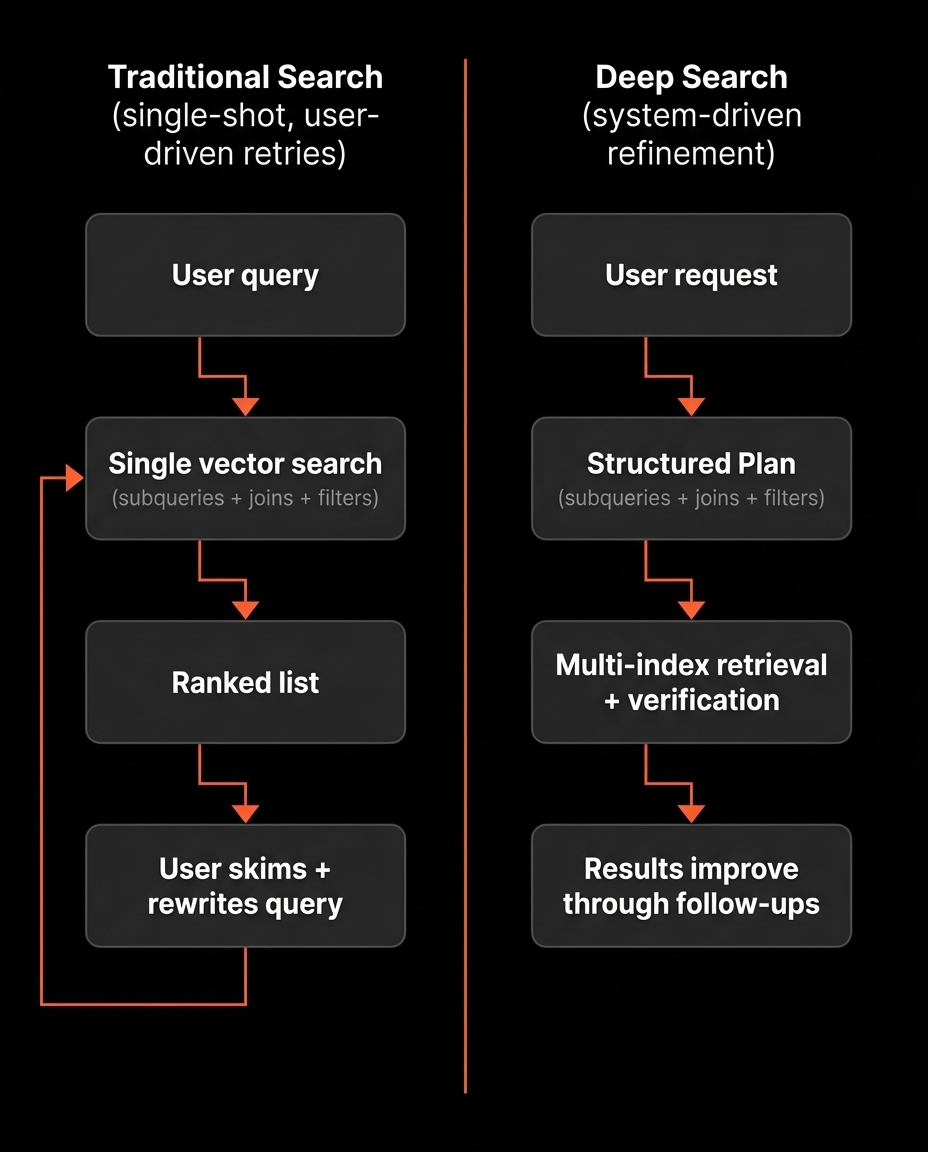
They know what they want to find inside a video or across a collection. Most traditional video search systems are hit or miss. They run one search, return a ranked list, and stop. If the top results are wrong, the system does not improve. The user has to restart by rewriting the query and trying again.
That leads to the same loop every time: search, skim, rephrase, restart. It forces retries with no learning.
Deep Search is our answer. It turns the first query into a starting point, then uses follow-ups to revise how it searches and improve results over time. It does not only learn from user feedback, it also has its own internal checks that decide when results look wrong, adjust the search plan, and retry automatically.
The idea behind Deep Search
Deep Search takes a natural language request and returns matching clips.
The difference is how it gets there.
Instead of running a single search and hoping it lands, we convert the request into a structured Plan. We run multiple targeted searches across different indexes, combine the results, and verify whether the clips actually match the intent.
If the clips look good, we show them.
If the clips look wrong, we do not ask you to start over. We revise the Plan and try again. Sometimes that happens automatically. Sometimes we ask a short question when a missing detail blocks the search.
Once results are shown, you can steer with follow-ups like:
- keep the same character, but switch to outdoor scenes
- more like clip 2
- show only the parts where they are actually speaking
- find the version where the camera stays wide
For this to work, Deep Search needs structured, clip-level signals it can search, filter, and combine. That starts with indexing.
Indexing: how we make clips searchable
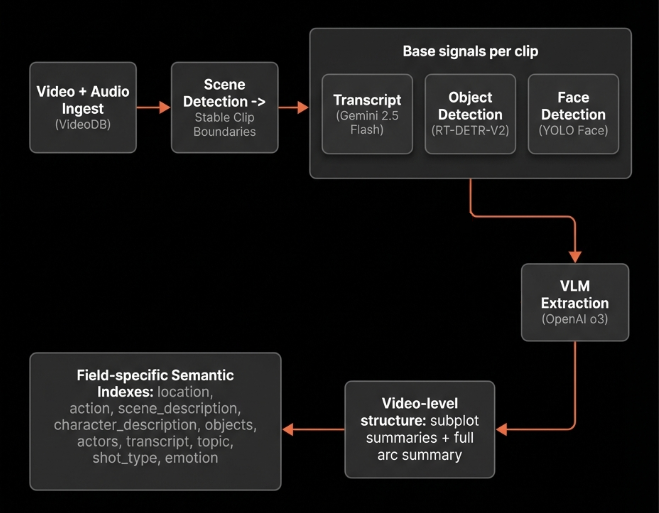
Deep Search works because it has real structure to work with.
Step 1: turn a video into scenes
We ingest the video and audio into VideoDB, then run scene detection using VideoDB. This gives us consistent clip boundaries for everything that follows.
Step 2: generate base signals per clip
For each clip, we generate foundational signals:
- Transcript generation using Gemini 2.5 Flash (128 Thinking Budget)
- Object detection using RT-DETR-V2
- Face detection using YOLO Face
These signals serve two purposes:
- They are directly searchable in some cases.
- They provide structured inputs for higher-level semantic extraction.
Step 3: extract structured meaning with a VLM
For each clip, we use OpenAI o3. The model fuses:
- clip frames (in order)
- the full transcript
- detected objects and faces
It outputs one unified JSON object per clip.
We keep fields short, evidence-based, and we attach confidence where uncertainty is expected.
Here are the extraction entities we store per clip and what they capture:
| Extraction entity | What it captures |
|---|---|
| location | Setting and environment. Interior or exterior, style, time of day, weather cues, and scene scale. |
| action | Dominant actions and interactions. Key verbs, motion, and actor object interactions. |
| scene description | Broad visual description. Costumes, colors, ambience, staging, plus on-screen text when present. |
| character description | Appearance and identity traits. Age cues, clothing, accessories, distinguishing features, and body language. |
| shot type | Dominant camera framing over the clip. For example wide, close-up, establishing. |
| emotion | Primary emotion signal for the clip with confidence and evidence source. |
| topic | What is being discussed or sung about, not the exact words. |
| transcript | The exact spoken words in the clip. |
| object description | Main objects and their attributes. Condition, color, distinctive markings, and relevance in the scene. |
| sound effects | Short, nameable audio events when present. For example gunshots, footsteps, sirens. |
This separation is intentional. Different signals express different semantics, and treating them separately gives us more control at retrieval time.
Step 4: video level structure
Once we have validated clip JSON objects across the timeline, we generate higher-level structure:
- subplot summaries that break the video into contiguous story segments
- a final summary that describes the full arc
These become additional searchable fields, especially useful when the user is describing an arc rather than a single moment.
Step 5: build separate semantic indexes
Finally, we create semantic indexes per field. Deep Search can then choose the best index for a given intent, instead of forcing everything through one embedding space.
With these indexes in place, a user request is no longer a single vector search. Deep Search interprets the request, picks the right mix of indexes and filters, and turns it into an executable plan. The next step is how that plan gets executed, how results from multiple indexes are combined, and how the system decides what to show.
Orchestrating Retrieval in Deep Search
Deep Search is not a single function call. It is a stateful orchestrator that runs a controlled loop.
It continues execution until one of two conditions is met:
- It has clips that are good enough to show
- It needs one missing piece of input to continue
To make this reliable, we model the system as a state machine using LangGraph. LangGraph allows us to define explicit nodes, transitions, and pause states while preserving execution state across retries and user interactions.
The graph structure
Deep Search consists of the following nodes:
- PlanInit: convert user intent into a structured Plan
- SearchJoin: execute the Plan and combine subquery results
- Validator: evaluate whether candidate clips satisfy intent
- NoneAnalyzer: handle empty results by broadening or clarifying
- Interpreter: convert feedback or follow-ups into controlled Plan edits
- Rerank: reorder accepted clips for display
- PreviewPage and ClarifyPause: the only two pause states, to show the ranked clips or to ask a clarification question before continuing respectively.
A routing step at the beginning determines whether execution is:
- a fresh request (start at PlanInit), or
- a resumed session (start at Interpreter with prior state)
There are two loops in the system.
The outer loop
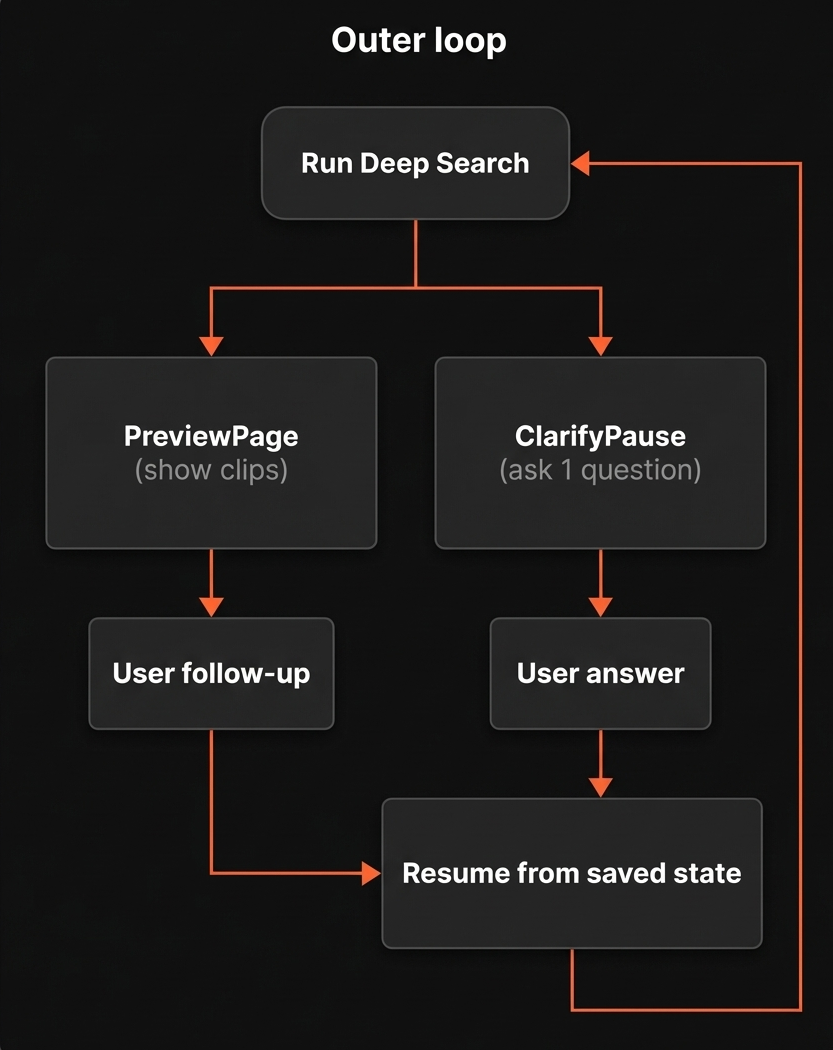
This is the loop you see.
Deep Search runs until it reaches one of two pause states:
- PreviewPage: show ranked clips
- ClarifyPause: ask a short clarification question
When a pause state is reached:
- The current graph state is persisted
- The system waits for user input
- Execution resumes from the saved state
This allows follow-ups to compound on previous reasoning rather than restarting the search.
The inner loop (internal retries)
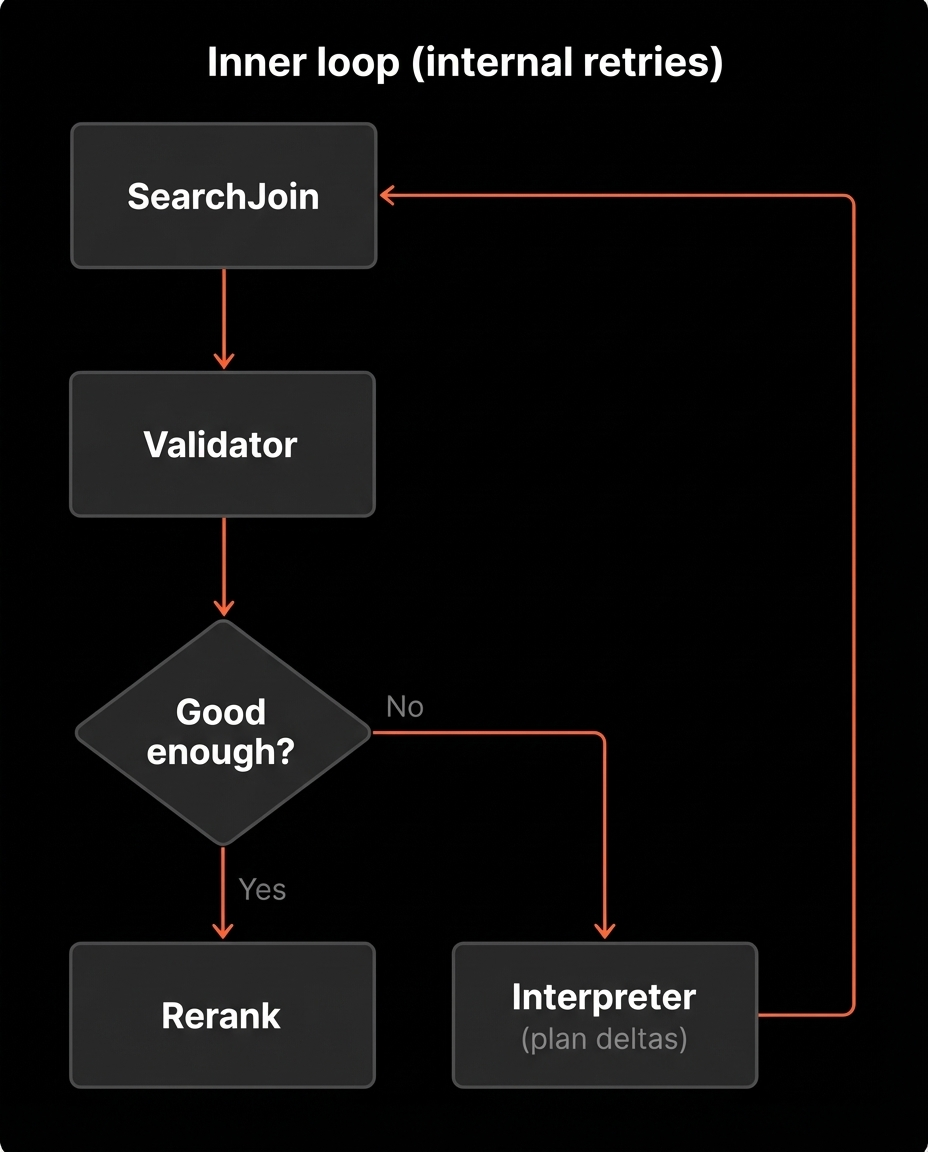
Inside a single run, Deep Search may revise and retry multiple times before it pauses.
A typical flow inside one run:
- Execute the current Plan in SearchJoin
- If candidates exist, send them to Validator
- If the join is empty or Validator rejects the candidates, revise the Plan
- Retry execution
The user only sees the final result of this internal loop.
Recursion limit
We cap the inner loop at 12 steps.
This limit exists because latency increases with each retry, and cost compounds.
If the cap is reached, we stop and surface a timeout instead of looping indefinitely.
Let's understand the internals using one example query and follow how it moves through these nodes.
Query: "Find clips where Tom Cruise is walking through a hotel corridor while talking on the phone."
PlanInit: Turning a request into a Plan
The first thing Deep Search does is PlanInit. This node converts the request into something executable.
The output is a Plan object that answers three questions:
- What to search for (expressed as a small set of subqueries)
- Where to search (meaning which indexes each subquery should target)
- How strict to be (meaning filters and how results should be combined)
A Plan has four main parts:
- Subqueries: Each subquery has an id, a query string, and a list of indexes to search
- JoinPlan: How to combine subquery result sets, AND for intersection or OR for union
- Metadata Filters: Faceted filters applied to every search call, like actors, characters, shot_type, emotion, objects
- Fallback Order: The order to relax constraints when results are poor
A simplified example looks like this:
subqueries:
  - subquery_id: Q1
    index: [location]
    q: "hotel corridor"
  - subquery_id: Q2
    index: [action]
    q: "walking while holding a phone"
    dialogue: false
  - subquery_id: Q3
    index: [transcript, topic]
    q: "talking on the phone"
join_plan:
  op: AND
  subqueries: [Q1, Q2, Q3]
metadata_filters:
  actors: ["Tom Cruise"]
fallback_order: ["actors"]
PlanInit does not try to compress everything into one query string. It decomposes the intent into a few targeted searches that can be combined later.
It also extracts metadata filters. In this case, Tom Cruise becomes an actors filter, which is applied to every search call so retrieval happens inside the right subset of clips from the start.
How fallback is decided
Fallback is not a fixed priority list.
Instead, we treat the Plan as a hierarchy of constraints. Some constraints define the core moment (for example, location + action). Others refine or enrich it (for example, shot style or emotional tone).
When we broaden, we relax constraints that are most likely to be over-restrictive in context, based on:
- which subqueries returned zero hits
- which constraints caused empty intersections
- Validator feedback
- session history
This is why fallback order is dynamic rather than hard-coded.
SearchJoin: Executing the Plan and combining results
Once PlanInit produces a Plan, the next node is SearchJoin. This is where the plan turns into clip candidates.
SearchJoin does two things:
- execute each subquery against the right indexes
- combine the result sets using the JoinPlan
Step 1: run subqueries in parallel
Each subquery targets one or more indexes. SearchJoin runs them independently.
Before it queries an index, it generates a few alternative phrasings of the subquery. This improves recall because the wording that matches the indexed text is not always the wording the user typed.
By default, we generate a small number of variants per subquery. If the subquery targets dialogue indexes like transcript or topic, we also keep the original phrasing as an extra variant, since exact wording often matters for dialogue.
For each variant, we call the VideoDB search API with the plan's metadata_filters applied. That means the actor filter from the example is active for every call.
Each subquery produces a set of clip hits with scores. If the same clip appears across multiple variants for the same subquery, we fuse those hits into one clip entry and keep the best score.
At the end of this step, we have one result set per subquery.
Step 2: boolean join across subqueries
Now SearchJoin applies the join_plan.
If the join_plan uses AND, we take the intersection. A clip survives only if it appears in every subquery result set.
If the join_plan uses OR, we take the union. A clip survives if it appears in any subquery result set.
The join step produces JoinedShot objects. Each JoinedShot keeps:
- the clip boundary (video_id, start, end)
- which subquery contributed the highest score for that clip, called the primary subquery
- which other subqueries also matched that clip, called support subqueries
The output of SearchJoin is a single list of joined_shots sorted by score.
If joined_shots is empty, the graph routes to NoneAnalyzer.
If joined_shots is non-empty, the graph routes to Validator.
Where we are in the flow
At this point, PlanInit has produced a Plan and SearchJoin has executed it. From here the graph splits based on whether we got any candidate clips.
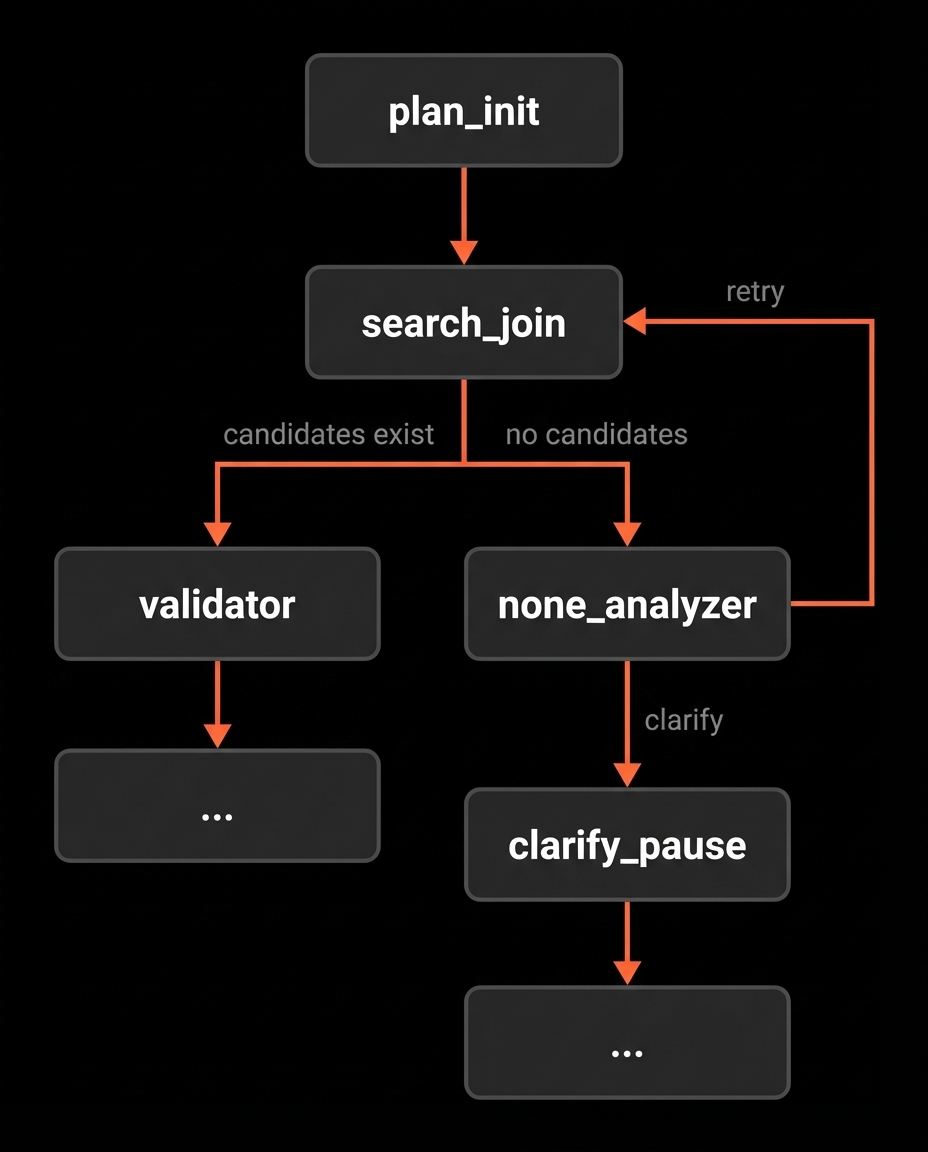
We have covered PlanInit and SearchJoin. Next we cover the two branches right after the fork: Validator handles the non-empty case, and NoneAnalyzer handles the empty case.
Validator: Verifying candidate clips
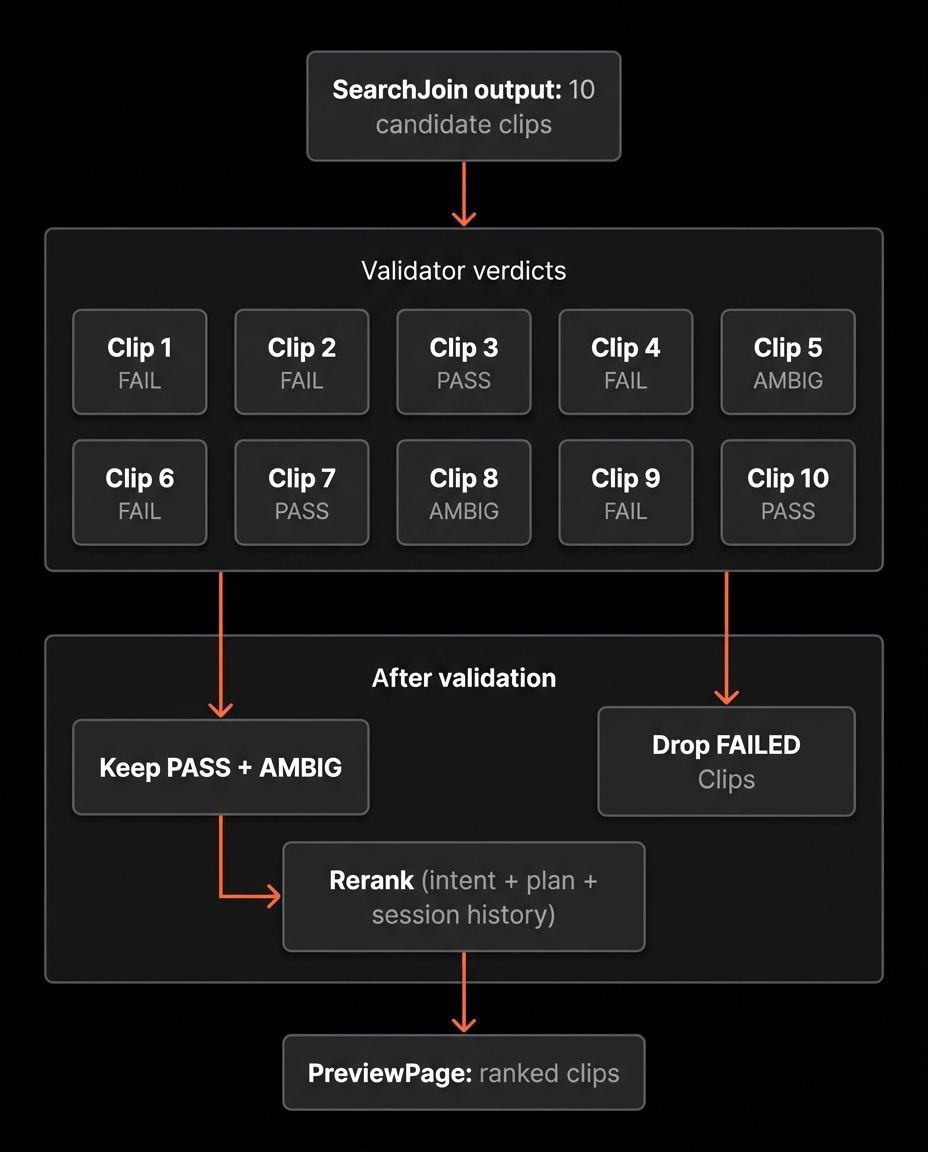
SearchJoin returns candidates based on semantic similarity and boolean joins. That produces plausible matches, but plausibility is not enough.
A clip can score high and still miss the intent in subtle ways:
- the action matches but the location does not
- the character appears but is not performing the requested action
- dialogue contains similar wording but refers to something else
Validator is the final verification layer before results are shown.
What Validator does
For each candidate clip, Validator asks:
Does this clip satisfy the user's intent under the current Plan?
Validator is LLM-based.
For each batch (up to 8 clips), we provide:
- the original user query
- the current Plan snapshot (subqueries, joins, filters)
- structured clip-level signals (location, action, transcript snippet, shot type, etc.)
- relevant session history
We validate in batches rather than all at once.
The primary reason is context reliability.
Limiting batches to 8 clips keeps the prompt within a reliable reasoning window. When there are more candidates, we evaluate multiple batches in parallel.
Evidence grounding
Validator does not reprocess video frames.
It operates only on previously extracted structured signals and transcript snippets. This constrains decisions to known evidence and reduces hallucinated matches.
Verdict structure
Each clip receives one of three labels:
- Pass: strong alignment with the full intent
- Ambiguous: partial alignment or missing evidence
- Fail: contradiction or mismatch
We treat Pass and Ambiguous as usable to preserve recall, but Ambiguous clips are ranked lower unless user steering favours them.
When all candidates fail
If every candidate is labeled Fail, Validator produces a structured feedback object describing the mismatch pattern, for example:
- "location constraint satisfied but action missing"
- "dialogue matched but no speaking action detected"
- "actor filter overly restrictive"
This feedback is passed to Interpreter, which applies controlled edits to the Plan and triggers another SearchJoin.
Validator does not just filter results, it generates the signal that drives the next iteration.
NoneAnalyzer: When the join returns nothing
NoneAnalyzer runs only in one situation: SearchJoin produced zero candidate clips.
This usually means the Plan is too strict somewhere. The join may be intersecting signals that rarely co-occur. A filter may be narrowing too hard. A subquery may be phrased in a way that does not match the collection's vocabulary.
NoneAnalyzer looks at the current query, the current Plan, and what has already been tried in the session, then chooses one of two outcomes:
- revise the Plan to broaden recall, then retry SearchJoin
- pause and ask a short clarification question, because a missing detail is blocking the search
Broadening is done through controlled edits, typical changes include:
- relaxing low priority constraints first, like objects or emotion
- weakening the join strategy, for example switching part of an AND into an OR (if it makes sense)
- rewording a subquery to be less specific
- adding an extra index to a subquery to give it another source of evidence
If NoneAnalyzer decides a missing detail is the real blocker, it routes to ClarifyPause and asks a single question. Once the user answers, the graph resumes and continues with an updated Plan.
Where we are in the flow
At this point we have covered how the plan is built, how it is executed, and how we branch based on results. Next is the Interpreter, it is the junction that converts feedback into the next attempt.
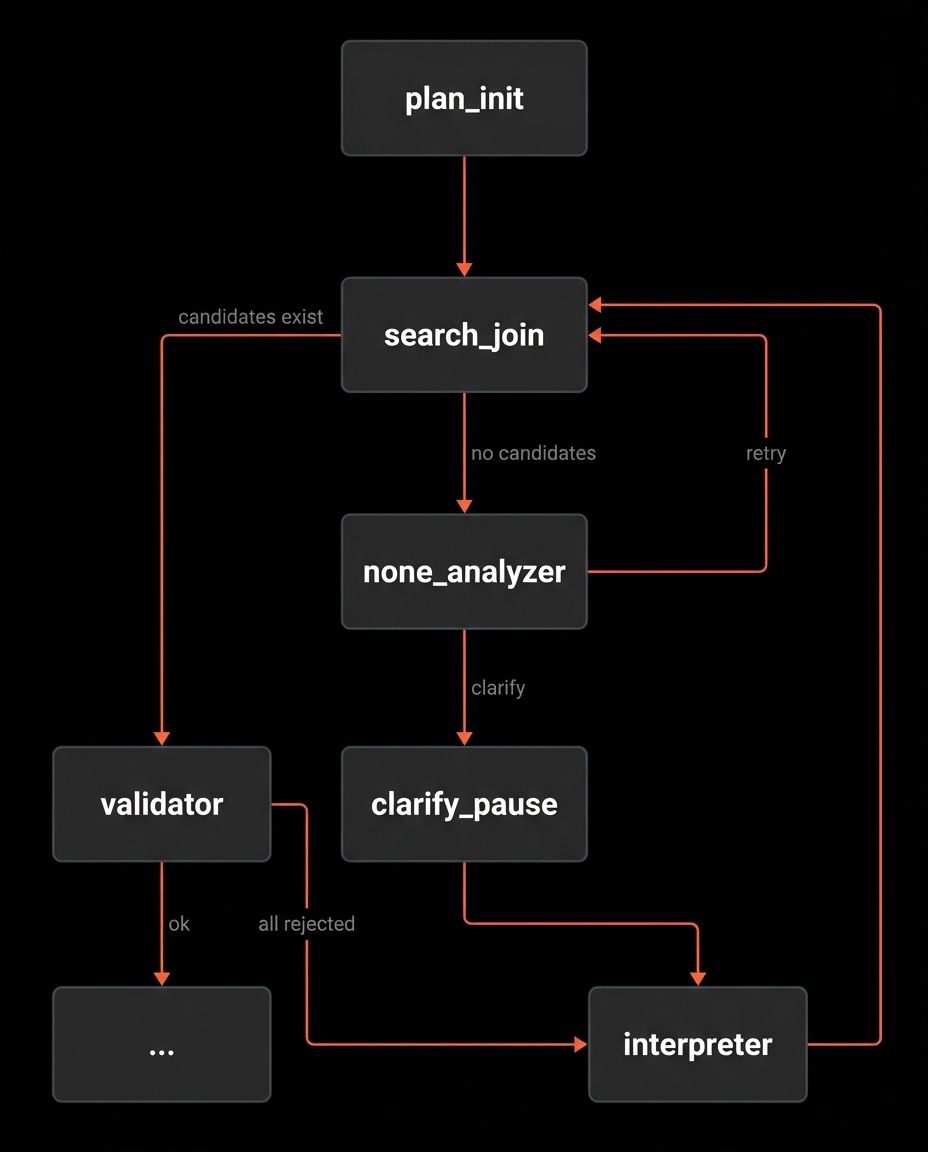
Interpreter: Turning feedback into plan edits
The Interpreter is the node that makes the loop move.
It runs in two situations:
- after a pause, when the user sends a follow-up or answers a clarification question
- after Validator rejects all candidates and returns feedback
In both cases, the job is the same. Take a signal and convert it into a small, controlled update to the current Plan.
What the Interpreter reads
The Interpreter looks at the full context it needs to make a good decision:
- the original query
- the current Plan
- the most recent results shown to the user, if any
- the user input, if we are resuming after a pause
- Validator feedback, if we are in the all-rejected path
- the accumulated history of plan changes and questions and answers in the session
This is important because a follow-up is rarely meaningful on its own. For example, more like clip 2 only makes sense if the system knows what clip 2 was.
What the Interpreter outputs
The Interpreter produces one of two outcomes:
- a batch of plan edits
- a clarification question, if it still needs a missing detail
Most of the time it returns plan edits.
Those edits are applied to the Plan, recorded in history, and the graph routes back to SearchJoin to run the updated plan.
How the loop reconnects to SearchJoin
Any time the system decides the Plan needs to change, it routes back to SearchJoin. That includes:
- NoneAnalyzer broadening the Plan after an empty join
- Interpreter applying user follow ups after a pause
- Interpreter applying Validator feedback when all candidates are rejected
SearchJoin stays the single execution point. The rest of the graph exists to decide whether the Plan is good enough, and if not, how to revise it.
What happens when Validator accepts
When Validator returns at least one candidate as Pass or Ambiguous, the system has something usable. At that point the flow stops being about recovery and becomes about presentation.
The next node is Rerank.
Rerank takes the accepted candidates and reorders them into a final ranked list for display. The input to Rerank is not only retrieval scores. It includes the original query, the current Plan, and the session history, so reranking can reflect intent and preferences, not just similarity.
Rerank returns a permutation of clip ids.
After Rerank, the graph pauses at PreviewPage and returns the ranked clips.
The Entire Flow
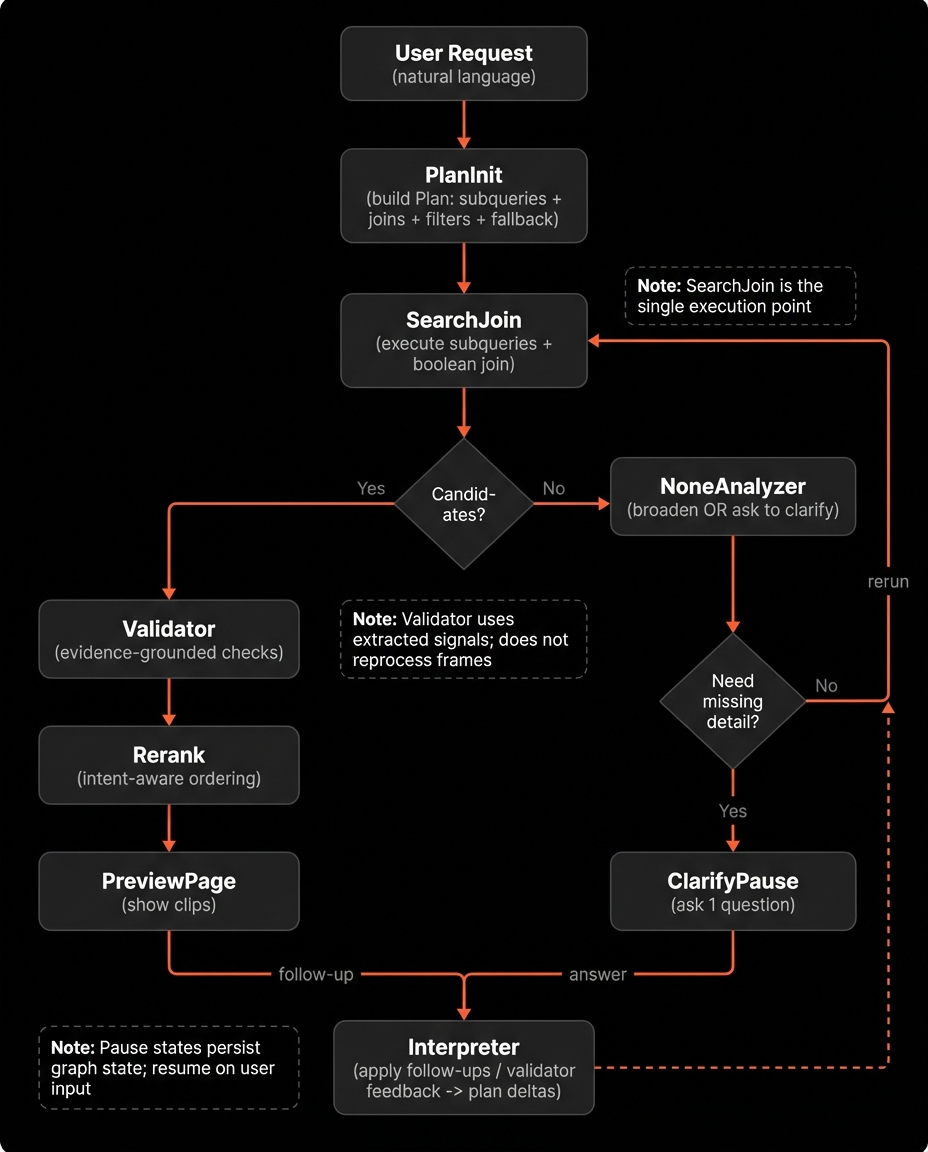
This covers the full loop: plan generation or follow-up interpretation, execution in SearchJoin, branching on empty vs non-empty results, validation, retries through plan edits, and finally reranking and pausing to show clips.
Where Deep Search Works Best
Deep Search is designed for finding a specific moment.
It works best when the user knows what they are looking for, and wants to refine toward the exact clip.
It is less suited for broad discovery prompts such as "funny scenes" or "best moments." Those depend heavily on subjective taste and editorial judgment. They are closer to recommendation or ranking problems than precise retrieval.